We’ve all been there: you spend hours designing a clean server setup, configure your services, wire up backups, tune firewalls, and tell yourself: “I’ll write the documentation tomorrow.”
Spoiler alert: tomorrow never comes.
And even if you do sit down and write documentation, the dreaded documentation rot sets in almost immediately. Three weeks later, you adjust a backup schedule from hourly to daily, add a directory to an exclude list, add another S3 bucket, or reassign a port. Do you remember to update the README or your wiki page every single time? Probably not.
In traditional setups, documentation and infrastructure live in two completely separate worlds. Keeping them in sync requires discipline that humans just aren’t good at (at least most :D).
If you are using Nix/NixOS, though, something interesting happens: your entire infrastructure is already declared as structured data. Every service, cron schedule, mount point, firewall rule, and backup configuration exists as evaluated Nix expressions.
So why are we still copying and pasting values from Nix files into markdown tables by hand? Why not just let Nix document itself?
The Idea: Documentation as a Build Artifact
The NixOS module system is built around merging options declared across multiple files into a unified config.
Instead of treating documentation as a separate task, we can introduce a small NixOS module, in my configs I called it tf.docs.
It allows any other module in your system to contribute its own documentation section.
Each service knows its own configuration best:
- Your backup module knows which repositories and snapshot paths are configured.
- Your web server module knows which virtual hosts and reverse proxies are active.
- Your monitoring module knows which healthchecks exist and where they ping.
All we need is a central aggregator that collects these sections and writes out a clean Markdown file for the host.
The Core Module
Here is the NixOS module that handles collecting and assembling the documentation:
{ config, lib, ...}: let inherit (lib) mkOption types concatMapStringsSep; cfg = config.tf.docs;in { options.tf.docs = { pre = mkOption { type = types.str; default = ""; description = '' Content to add before all sections. ''; }; sections = mkOption { type = types.listOf types.str; default = builtins.sort builtins.lessThan (builtins.attrNames cfg.section); description = '' Specify which sections (+ which order) to display for this host. ''; }; section = mkOption { type = types.attrsOf (types.submodule { options = { content = mkOption { type = types.str; default = "No content"; description = '' Markdown content of this section. ''; }; }; }); default = {}; description = '' Define sections for the documentation. ''; }; post = mkOption { type = types.str; default = ""; description = '' Content to add after all sections. ''; };
output = mkOption { type = types.package; readOnly = true; description = '' Resulting markdown file containing the docs for this host. ''; }; }; config.tf.docs.output = builtins.toFile "docs-${config.networking.hostName}" '' # ${config.networking.hostName}
${cfg.pre}
${concatMapStringsSep "\n" (sectionName: cfg.section.${sectionName}.content) cfg.sections}
${cfg.post} '';}How this works:
tf.docs.pre&tf.docs.post: Optional markdown snippets (e.g. host specs, OS version, location) to insert at the top or bottom of the generated page.tf.docs.section.<name>.content: An open attribute set of submodules. Any service module anywhere in your configuration can inject its own markdown string under an arbitrary section name.tf.docs.sections: An optional list of section names allowing you to control the exact rendering order, defaulting to alphabetical sorting.config.tf.docs.output: Generates a derivation withbuiltins.toFilethat combines the host name header,pre, all sections joined with newlines, andpost.
Because this is a standard NixOS submodule, it stays completely decoupled: if a service is disabled or removed from a host, its documentation section simply isn’t evaluated. No stale docs left behind!
Practical Example: Documenting Backups (Kopia)
Backups are a prime example where documentation rot is dangerous. When disaster strikes, you don’t want to wonder whether directory /var/lib/data was actually included in the hourly snapshot or if it was omitted. You need accurate, authoritative information.
In my own module for Kopia for example, I map over all defined repositories and snapshots to output markdown tables:
tf.docs.section."kopia".content = '' ## Kopia
${concatMapStringsSep "\n" (repoName: let repo = cfg.repositories.${repoName}; in '' ### Repository `${repoName}`
| | | |-|-| |S3 Bucket|`${repo.s3.bucket or "none"}`| |S3 Endpoint|`${repo.s3.endpoint or "none"}`| |Policies|<code>${builtins.toJSON repo.policies}</code>|
#### Snapshots
|Name|Schedule|Paths|Healthcheck| |----|--------|-----|-----------| ${concatMapStringsSep "\n" (snapshotName: let snapshot = repo.snapshots.${snapshotName}; in '' |${snapshotName}|`${snapshot.schedule}`|<ul>${concatMapStrings (p: "<li>`${p}`</li>") snapshot.paths}</ul>|[${snapshot.healthcheckName or ""}](#check-${snapshot.healthcheckName or ""})| '') (builtins.attrNames repo.snapshots)} '') (builtins.attrNames cfg.repositories)} '';Whenever I add a new snapshot path or adjust the schedule in Nix, the documentation updates automatically when the configuration is evaluated.
Which then looks like this:
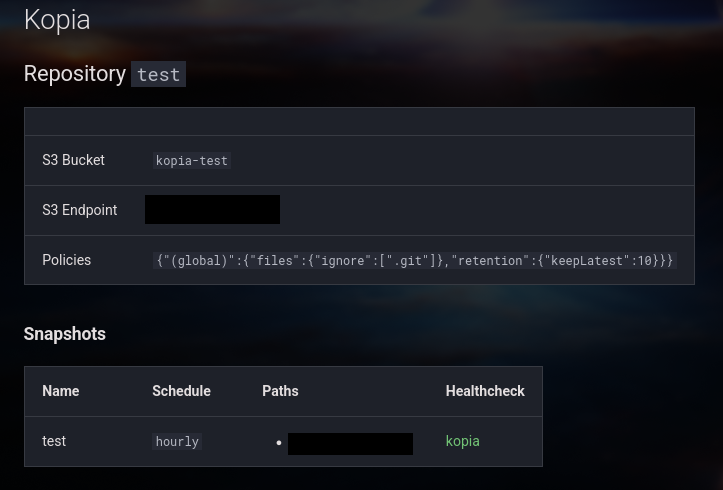
Rendered with NixMkDocs, you get an instantly readable, dark-mode dashboard detailing the exact state of the system—with tables, code blocks, and clickable healthcheck links.
Building the Documentation Site
Since config.tf.docs.output is a regular Nix derivation containing a markdown file, we can easily aggregate the docs for all our servers into a full documentation site across our entire flake.
In your flake.nix, you can map over nixosConfigurations:
# Collect all host documentation filesdocsForHosts = pkgs.runCommand "collected-host-docs" {} '' mkdir -p $out/hosts ${lib.concatStringsSep "\n" (lib.mapAttrsToList (hostname: host: '' cp ${host.config.tf.docs.output} $out/hosts/${hostname}.md '') self.nixosConfigurations)}'';From there, you can feed $out/hosts straight into MkDocs or a simple build script.
Every time you push a git commit or run CI, the documentation site rebuilds automatically.
Or, if you’re already using NixMkDocs and rensa-nix, you can simply add:
{inputs, ...}: let inherit (inputs) parent doclib pkgs; inherit (pkgs.lib) mapAttrs; hosts = parent.self.nixosConfigurations;in (doclib.mkDocs { docs."default" = { # ... other configuration dynamic-nav = { enable = true; files."Hosts" = mapAttrs (_name: value: value.config.tf.docs.output or null) hosts; }; }; }).packagesThis also automatically nicely shows all your hosts in the sidebar:
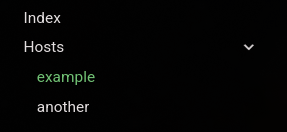
Beyond NixOS: Documenting Everything Nix Generates
NixOS is just the tip of the iceberg. Once you experience how effortless self-documenting infrastructure is, you start noticing that Nix is generating a lot of other things across your stack.
Because Nix is so powerful and flexible, any tool built on top of Nix can take advantage of this exact pattern:
- Podman Quadlets with QuadNix: Instead of maintaining hand-written lists of container services, ports, and volume mounts, QuadNix lets you define quadlets declaratively in Nix. Generating a markdown table with every container name, exposed host port, network, and mounted volume takes just a few lines of Nix.
- Kubernetes Manifests with Kubenix: Writing Kubernetes manifests with Nix gives you access to full typed schemas. Why manually diagram your cluster ingress or namespace layout? You can traverse the evaluated resource tree to auto-generate markdown listing all ingresses, domains, TLS certificates, and resource requests.
- Terraform & OpenTofu with Tofunix: Cloud infrastructure is notorious for becoming an undocumented sprawl of VPCs, subnets, peering connections, and security groups. With Tofunix, your cloud resources are declared in Nix. You can automatically produce up-to-date network topology summaries and cloud asset tables right alongside the code that provisions them.
- Ansible Playbooks with Nixible: When configuring non-NixOS nodes with Ansible, Nixible brings Nix’s declarative safety to playbooks and roles. You can easily dump role inventories, target host mappings, and variable definitions into your docs without lifting a finger.
If you already use Nix to manage your infrastructure, you’re 90% of the way there. All it takes is a small aggregator module and a bit of string interpolation to turn your Nix code into actually useful documentation, fully automated :D